Expensify – Expense on the Go
When it comes to tracking travel expenses, I am my own worst enemy. It can be so easy to crumple a receipt and forget about it. Then, at the end of the month when I go over expense reports I kick myself for it. One solution that works well for me is to go all digital. Mobile apps like Expensify make it so easy since I can scan the receipt and toss it. What about email receipts, though? Sometimes I forget what email I used or the email just gets lost altogether in my spam.
Connect your apps! Auto-forward Uber trip receipts to Expensify
Note: Even if a company has invited staff to its Uber Business Profile, that centrally managed Business Profile cannot be linked to Expensify. Instead, these steps help users add a new Business profile on their personal Uber account in order to forward ride receipts to their Expensify account.
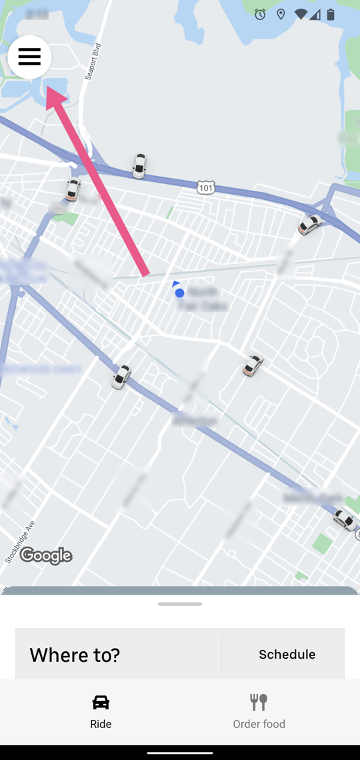
Start by logging in to Uber on mobile. Then tap the three lines in the top-left to open the menu. Then select Wallet as shown below.
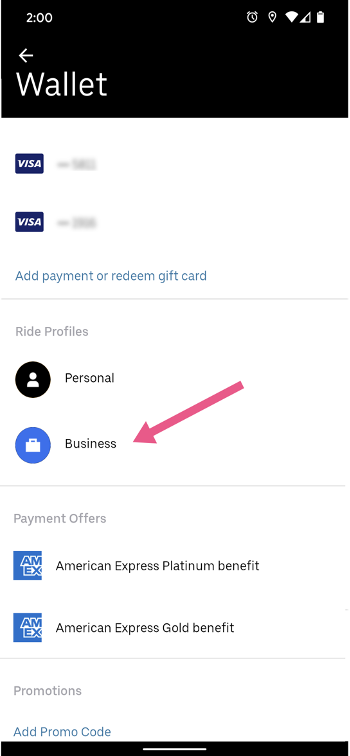
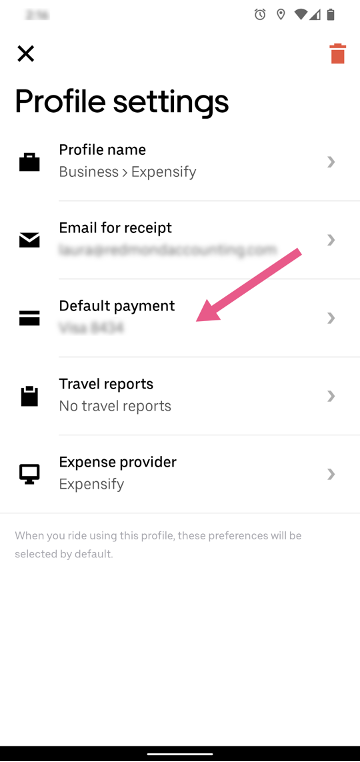
Next, scroll down to the Ride Profiles section and tap on Business. Now, as pictured, select the row ‘Email for receipt’ and enter the email address that you use to login to Expensify. When Uber sends your receipts to Expensify, this is how Expensify knows which user’s account to add the receipt.
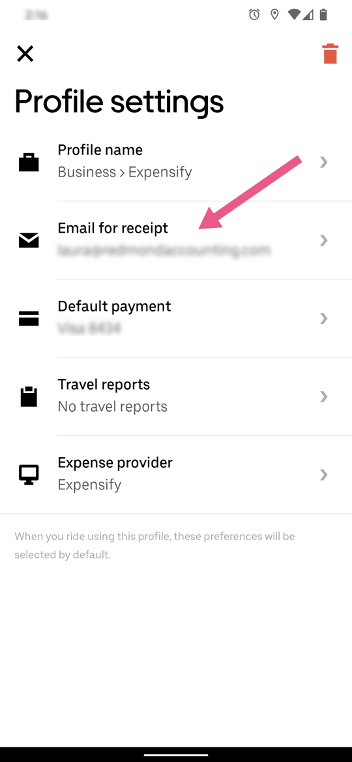
After, tap on the row ‘Default payment’ and add your company credit card or other preferred payment info as the payment method that you want to use to pay for these business trips.
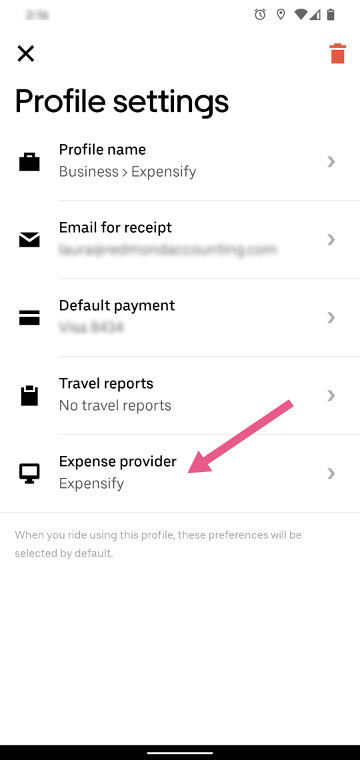
And finally, tap on the row ‘Expense provider’ to select Expensify.
Done!
The Redmond Accounting team has compiled all of our processes like this one into live interactive checklists to help you run your business efficiently. Our library of checklists spans from the basics of bookkeeping to cloud integration such as this. We’re enabling clients to manage their own books and go entirely virtual on their own, for much less than it would cost to have someone else do it.
If you’re looking to improve your bookkeeping workflow, schedule a complimentary consult so we can learn more about your business’s needs. We’d love to help you empower your business through accounting expertise and insight.
Related Posts on Redmond Accounting CA
-
The case for going paperlessThe case for going paperless Paper documents are vulnerable. Paper is fragile and subject to damage through fire and flooding, and physical documents are easily stolen. Digital documents stored in the cloud, on the other hand, are secure and can be backed up to multiple different locations automatically. Paper documents also cost too much in labor -- filing, searching for…
-
Spring Cleaning for BookkeepingSpring Cleaning for Bookkeeping It’s that time of the year again. Don’t let the months go by cluttered with paper. Redmond Accounting went paperless years ago and we’ve never looked back. Save yourself time by getting rid of the endless filing. Even with going paperless, we still recommend doing some spring cleaning for bookkeeping to ensure you always have access…
-
QuickBooks Tip: Receipt CaptureQuickBooks Tip: Receipt Capture It is important to keep supporting documentation on the use of a company's funds, whether funds are spent via cash, company check, wire, ACH or company credit card. Many businesses use a company credit card for making purchases because of the ease of making payment. Recording the purchase activity on credit cards can be automated by connecting…
-
How to Use Expensify to Automate Your Lyft ExpensesHow to Use Expensify to Automate Your Lyft Expenses It is great that we have for the most part evolved from paper receipts. They always ended up crumpled somewhere, anyway. Unfortunately, it is easy to find yourself in a similar situation with email receipts. Digging through spam and archives at the end of the month to find them feels like…
-
Bill.com, a Cornerstone of Our BusinessBill.com, a Cornerstone of Our Business We at Redmond have been using Bill.com for a decade. It is an intelligent way to create and pay bills. And it is truly a cornerstone of our business. It exemplifies the modern methods of accounting that we evangelize - from security to automation to electronic payments to online access. In December, we were…
-
Approving Bills With Bill.com Approval ProcessApproving Bills With Bill.com Approval Process Last week we spotlighted one of our favorite apps for online bill pay to vendors - Bill.com. We showed you their new interface along with this checklist with step-by-step instructions for users approving bills. Let’s take a closer look. Our experts can automate your bill pay process. Schedule a free consultation! Schedule now The…
-
Cash Flow 101Cash Flow 101 Cash in the bank is comforting. You use it to pay bills, buy inventory and expand your business. Your bank account balance tells you how much cash you have at that moment. But how much will you have in a week, a month, a quarter? That’s where cash flow comes in. Cash flow is a measurement of…
-
Workflow: Company Credit CardsWorkflow: Company Credit Cards Businesses generally follow best practices for purchasing goods and services by using controls such as purchase orders, check requests, and approval for vendor bill payments. But what happens when they pay by credit card? Our experts can automate your company credit card process. Schedule a free consultation! Schedule now Some businesses have one or two company…
-
Connecting Apps with ZapierConnecting Apps with Zapier There’s so much information circulating at our fingertips via social media, email and push notifications. I can’t possibly read all the articles I’m interested in and still get all my work done. When I see an article or website that I want to read when I don’t have time, I click the Zap extension on my browser.…