Manage Cash Flow with Bill.Com Pay by Card
Bill.com has rolled out a new feature that provides you the freedom to pay how you want. Introducing, Bill.com Pay by Card.

What Does This Mean for You?
Now you can pay vendors by credit card even if they don’t typically accept cards. So, earn rewards and your favorite perks (points, miles, rebates, etc.) when you pay your vendors by credit card. Using your card may provide you with deferred payments, and free up cash flow with credit card payments to vendors.
With Bill.com and automatic sync, it cuts down on manual entry and reduces errors. It is easy to get started and easy to use.
How Does Bill.com Pay By Card Work?
It’s quite simple:
- Decide which bills you want to pay by card
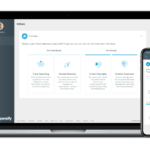
- Add your card
- Make a card payment with the card you added, no matter if the vendor accepts card payments or not
- Then pay your vendor via ACH or check, whichever method of payment they are set up for
A charge for the payment will be made plus an industry-standard 2.9% transaction fee.
Bill.com processes your credit card payment and then pays your vendors by ACH payment or check.
Vendors receive their payments by ACH or check but you get to pay by credit card, earning credit card rewards and deferring payments to better manage your cash flow.

Any U.S. credit or debit card may be used for Bill.com card payments, except prepaid cards, or gift cards; these payment methods are not supported at this time.
How Long Do Bill.com Pay by Card Payments Take?
In most cases, funds will be deposited the next business day after your card has been processed. For vendors that have just signed up to receive ACH payments, it can take up to 5 business days to receive the first payment.
Check vendors will generally receive payments within 5 – 7 business days, depending on mail delivery speed.
When you make a payment with your credit card, an estimated date that the payment will be received by your vendor will be shown.
There are no charges to your vendor.
Cash Flow Made Easier

Leveraging Pay by Card functionality allows you to work smarter, not harder by freeing up your cash flow. RAI is dedicated to fueling your success through automation and insight. We reduce your accounting workload so you have more time for everything else. Find a solution that saves you time by scheduling an appointment with us: LET’S MEET
Related Posts on Redmond Accounting CA
-
The Expensify CardThe Expensify Card The Expensify Card is a corporate credit card that is designed to simplify the expense management process for businesses. The card is issued by Expensify that provides expense tracking, reporting, and reimbursement solutions for businesses. How does the Expensify card work? The Expensify Card provides a seamless way for employees to make purchases, capture receipts, and reconcile…
-
How to Manage Cash Flow in a Small BusinessHow to Manage Cash Flow in a Small Business Cash flow can make or break a business. In fact, a U.S. Bank study found that 82% of failed businesses cited cash flow as a contributing factor to their demise. We don’t want your business to be another statistic. Learning how to manage cash flow in a small business will take…
-
Get Paid Faster!Get Paid Faster! QuickBooks Payments is Intuit's service for processing customer payments in QuickBooks Online. This add-on service was previously know as QuickBooks Merchant Services, Intuit Payment Solutions or Intuit Payment Network. It is now called QuickBooks Payments. QB Payments allows businesses to accept both credit card and bank draft (ACH) payments from customers. QuickBooks Payments powers these payment options:…
-
Workflow: Company Credit CardsWorkflow: Company Credit Cards Businesses generally follow best practices for purchasing goods and services by using controls such as purchase orders, check requests, and approval for vendor bill payments. But what happens when they pay by credit card? Our experts can automate your company credit card process. Schedule a free consultation! Schedule now Some businesses have one or two company…
-
How Does Bill.com Work?What is Bill.com and How Does It Work? You've heard of the name BILL, or Bill.com, but what is it and how does it work? If you're a business owner who has bills, expenses and invoices, it's a powerful tool that can help you take control of your business. What is Bill.com? BILL (the company rebranded from Bill.com), is a…
-
Law Firm Cash Flow: Why Clients Pay Late and How to Fix ItLaw Firm Cash Flow: Why Clients Pay Late and How to Fix It Cash flow is the lifeblood of your law firm. It ensures your bills are paid and your clients receive the service they expect. Yet many firms struggle to manage theirs properly. In fact, an estimated 82% of small businesses, including law firms, fail due to cash flow…
-
Managing Accounts Receivable: How to Get Clients to Pay You FasterManaging Accounts Receivable: How to Get Clients to Pay You Faster Struggling with late invoice payments? You’re not alone. According to QuickBooks, 56% of small businesses are owed money from unpaid invoices. Those unpaid bills? They can have a ripple effect on your business, from poor cash flow management to delayed growth. But here’s the good news: you can minimize…
-
QuickBooks Tip: Receipt CaptureQuickBooks Tip: Receipt Capture It is important to keep supporting documentation on the use of a company's funds, whether funds are spent via cash, company check, wire, ACH or company credit card. Many businesses use a company credit card for making purchases because of the ease of making payment. Recording the purchase activity on credit cards can be automated by connecting…
-
Take Action Against Fraud: 5 Things You Can Do TodayTake Action Against Fraud: 5 Things You Can Do Today Watch our webinar all about Take Action Against Fraud: 5 Things You Can Do Today Fraud is something no one wants to think about. However, businesses of 100 or less employees suffered $150,000 in losses on average. AND it typically takes up to 14 months to detect the fraud. Watch…